Octo Onboarding Series (2): Skills in Practice — Generate an Excel Report in One Sentence
The last post got octo installed and said a first word to it. This one solves something a lot of people do once a month and dread every time: putting together an expense spreadsheet.
What a Skill actually is, and why you never call it yourself
octo ships with a Skills system — each skill is a written instruction set for “when to use this and how,” sitting in ~/.octo/skills-default/. It doesn’t sit in context the whole time: at session start, only each skill’s name and a one-line description go into the system prompt; the full instructions only get loaded once you say something that actually matches one.
Which means you don’t need to know a skill exists, let alone invoke it by name. Open the Skills panel in the web UI and you’ll see the full installed list:
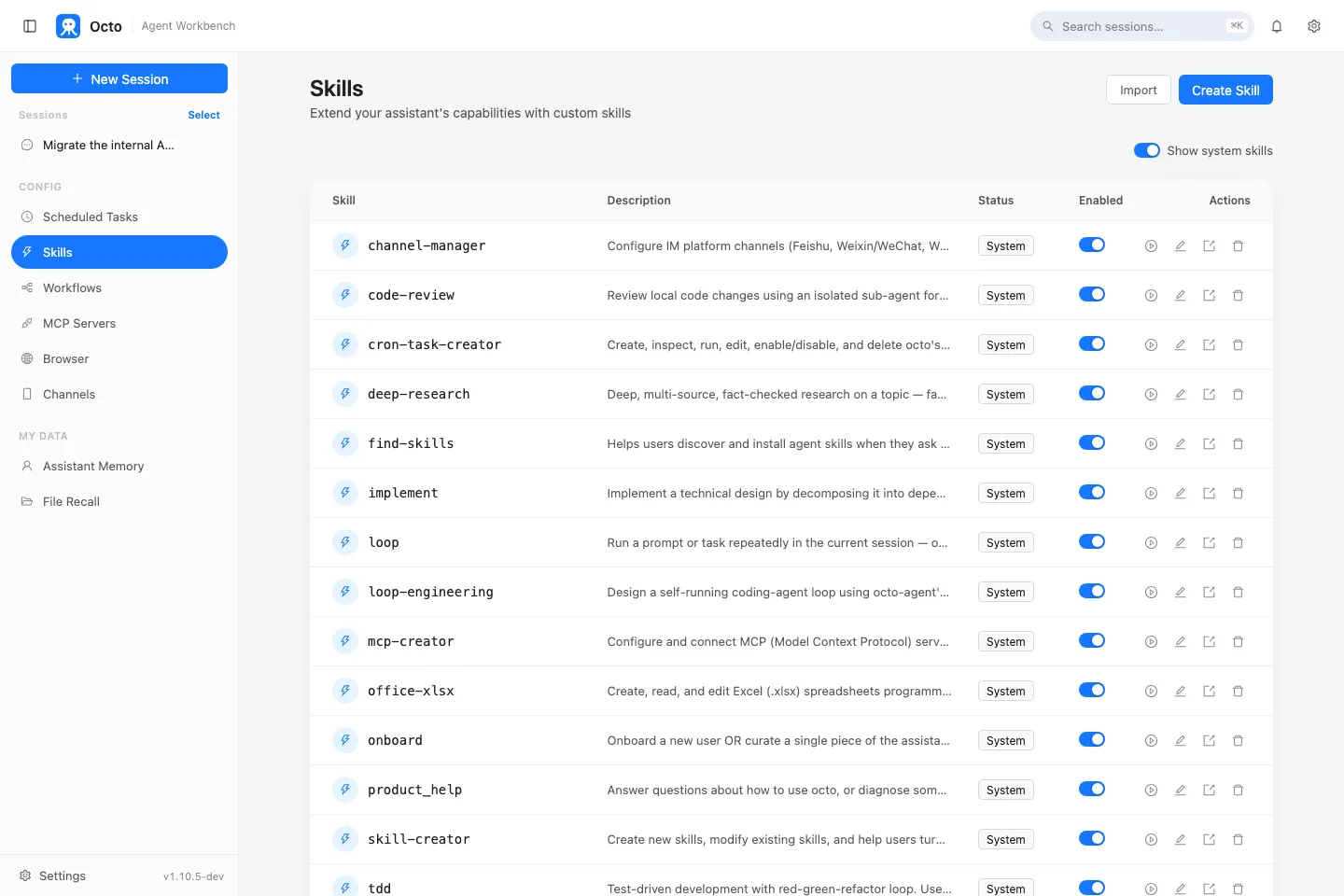
office-xlsx in that list is today’s subject — a skill for creating, reading, and editing Excel (.xlsx) files: formulas, styling, merged cells, multiple sheets, charts. You never click it, never say its name — the moment your request sounds like “make me a spreadsheet” or “edit this Excel file,” octo picks it up on its own.
Just say what you want
Say you need a July expense report. No need to think in openpyxl — just describe it in plain language:
Make me a 2026-07-expenses.xlsx. First sheet called "Detail" with
columns Date / Category / Amount / Note, fill in 10 sample rows using
categories like Food/Transport/Rent/Entertainment/Other. Second sheet
called "Summary" that totals amounts by category with a pie chart.
Once octo recognizes this as an Excel task, it loads the office-xlsx instructions and starts creating the file, writing data, building the summary formulas, and adding the chart per your description. Under the hood that’s two built-in scripts doing the actual work (xlsx_inspect.py reads structure, xlsx_edit.py makes edits, both openpyxl-based, dependencies installed on the fly via uv run with nothing left behind) — but you don’t need to know that. That’s the whole point of the Skills system: the know-how doesn’t have to live in your head.
flowchart LR
    A["You: describe the task in plain language"] --> B["octo matches the office-xlsx skill"]
    B --> C["Loads the skill's instructions"]
    C --> D["Calls xlsx_edit.py (openpyxl)"]
    D --> E["Produces the .xlsx file"]
Already have an old spreadsheet? It reads it before touching it
If you already have a file — one someone else made, or one you made last month — and you say “add a year-over-year growth column to this sheet,” octo first reads the existing structure with xlsx_inspect.py: what sheets exist, what the header row looks like, which cells hold formulas, whether anything is merged. It decides to do this on its own before editing — you don’t have to remind it.
Want different styling? Still just plain language
Bold the header row with a light blue fill; format the amount column
as currency with two decimals; sort the whole sheet by amount descending.
A real gotcha: don’t let it pre-compute a total
If you want a totals row, the right phrasing is to ask for a formula, not a computed number:
Add a totals row at the bottom of the detail sheet using a SUM formula
over the amount column — don't calculate it in Python and write a
hardcoded number.
The reason is practical: openpyxl, which office-xlsx is built on, never evaluates formulas — it can only write formula text; the actual calculation happens when Excel or LibreOffice opens the file. If you instead let it compute a number in Python and hardcode that into the cell, that number is frozen — edit a line item and the total silently stops matching it. Anything derived from other cells belongs in a formula. This is also a convention the skill follows on its own when it’s building anything that looks like a financial model.
This is just one example of the Skills system
office-xlsx is one of 18 built-in skills. The same pattern — match intent, auto-load, you just describe the task — is what powers octo reviewing a code diff (code-review), drafting a technical design doc (tech-design), and the scheduled tasks (cron-task-creator) and external-tool connections (mcp-creator) the next two posts cover — those are skills too, under the hood.
Previous in the series: Octo Onboarding Series (1): Install It, Say Your First Word to It Next in the series: Octo Onboarding Series (3): MCP in Practice — Connect GitHub and Let octo Triage Your Issues